https://github.com/oblador/react-native-vector-icons?tab=readme-ov-file#installation
GitHub - oblador/react-native-vector-icons: Customizable Icons for React Native with support for image source and full styling.
Customizable Icons for React Native with support for image source and full styling. - oblador/react-native-vector-icons
github.com
Step 1. 패키지 설치
npm install --save react-native-vector-icons
Step 2. X code 열기
프로젝트 파일 > ios > 프로젝트명.xcworkspace 파일 열기
Step 3. 폰트 파일 만들기
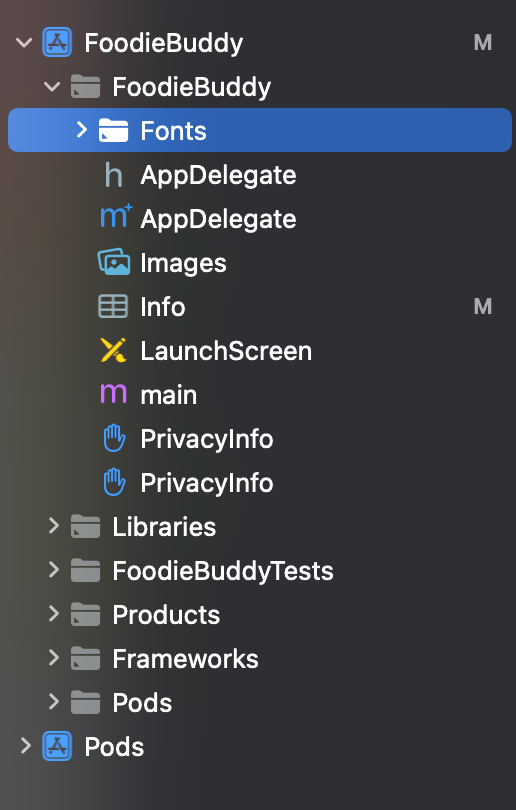
Step 4. Xcode 에 폰트 파일 옮겨주기
Finder 에서 프로젝트 폴터 > node_modules> react-native-vector-icons
폴더에 들어가면 다양한 파일이 있다. 원하는 폰트들만 골라서 step 3 에서 만든 폴더에 넣어준다.
https://oblador.github.io/react-native-vector-icons/
react-native-vector-icons directory
oblador.github.io
👆 어떤 폰트에 어떤 아이콘이 있는지 확인할 수 있는 사이트
Step 5. 폰트를 코드에 포함시키기
info.plist 파일에 아래의 코드 붙여넣기. (선택한 폰트만 발췌)
<key>UIAppFonts</key>
<array>
<string>AntDesign.ttf</string>
<string>Entypo.ttf</string>
<string>EvilIcons.ttf</string>
<string>Feather.ttf</string>
<string>FontAwesome.ttf</string>
<string>FontAwesome5_Brands.ttf</string>
<string>FontAwesome5_Regular.ttf</string>
<string>FontAwesome5_Solid.ttf</string>
<string>FontAwesome6_Brands.ttf</string>
<string>FontAwesome6_Regular.ttf</string>
<string>FontAwesome6_Solid.ttf</string>
<string>Foundation.ttf</string>
<string>Ionicons.ttf</string>
<string>MaterialIcons.ttf</string>
<string>MaterialCommunityIcons.ttf</string>
<string>SimpleLineIcons.ttf</string>
<string>Octicons.ttf</string>
<string>Zocial.ttf</string>
<string>Fontisto.ttf</string>
</array>
Xcode 에서 info 에 들어가면 item이 폰트 개수만큼 추가된 것을 확인할 수 있다.

Step 6. 프로젝트 recompile
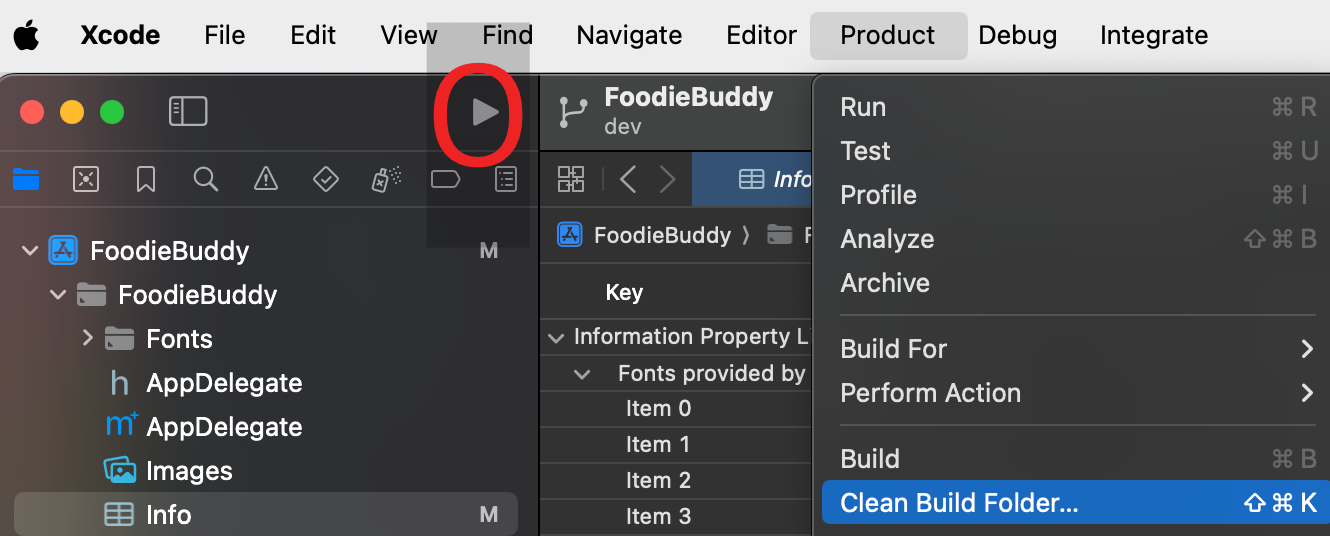
Xcode 에서 Xcode > Product > Clean Build Folder 후에 화살표 눌러 빌드
Step 7. Keep Xcode Version
The file "Pods.xcodeproj" has been modified by another application 이라는 경고 문구 뜨면 "Keep Xcode Version" 선택
Step 8. 아이콘 import
npm i -D @types/react-native-vector-icons 실행 후 아래의 코드 import
import Ionicons from 'react-native-vector-icons/Ionicons';Step 9. 아이콘 사용
<Ionicons name="albums" size={100} />'FE > React Native' 카테고리의 다른 글
| [React Native] WebSocket으로 구현하는 실시간 채팅 (1) | 2024.11.21 |
|---|---|
| Stack Navigation (0) | 2024.08.21 |
| [RN] 프로그램 만들기 / 깃허브 연결 (0) | 2024.05.26 |